By Avinash Rajan · Updated 16 September 2026
How to set up birthday reminders on iPhone
Save the birthday in the person's Contacts card, then go to Settings → Apps → Calendar → Default Alert Times → Birthdays and choose when to be alerted. If you want a night-before nudge and a way to call or open WhatsApp from the reminder, you can also set up the birthday in Nudge Monster.
Start with the part you need
Set up birthday alerts in Contacts and Calendar
- Save the date in Contacts. Open the person's contact, tap Edit, add or check their birthday, and save with Done. Put the date in the birthday field; a date written in Notes is not a birthday entry.
- Show the birthday calendar. Open Calendar, tap Calendars, and select Birthdays to display birthdays from Contacts.
- Choose an alert time. In Settings, open Apps → Calendar → Default Alert Times → Birthdays. Select the option that gives you enough time to act.
- Check notification delivery. In Settings → Notifications → Calendar, allow notifications and choose where you want alerts to appear.
These steps use Apple's built-in apps. You do not need a paid birthday app just to set a Calendar alert. Apple's guides explain editing contact details, showing the birthday calendar, and choosing alert times.
Add a birthday in Nudge Monster
Nudge Monster runs on iPhone with iOS 26 or later. Its birthday reminders add a night-before nudge, and Pro includes earlier gift reminders. Start with one person and check the setup before adding everyone.
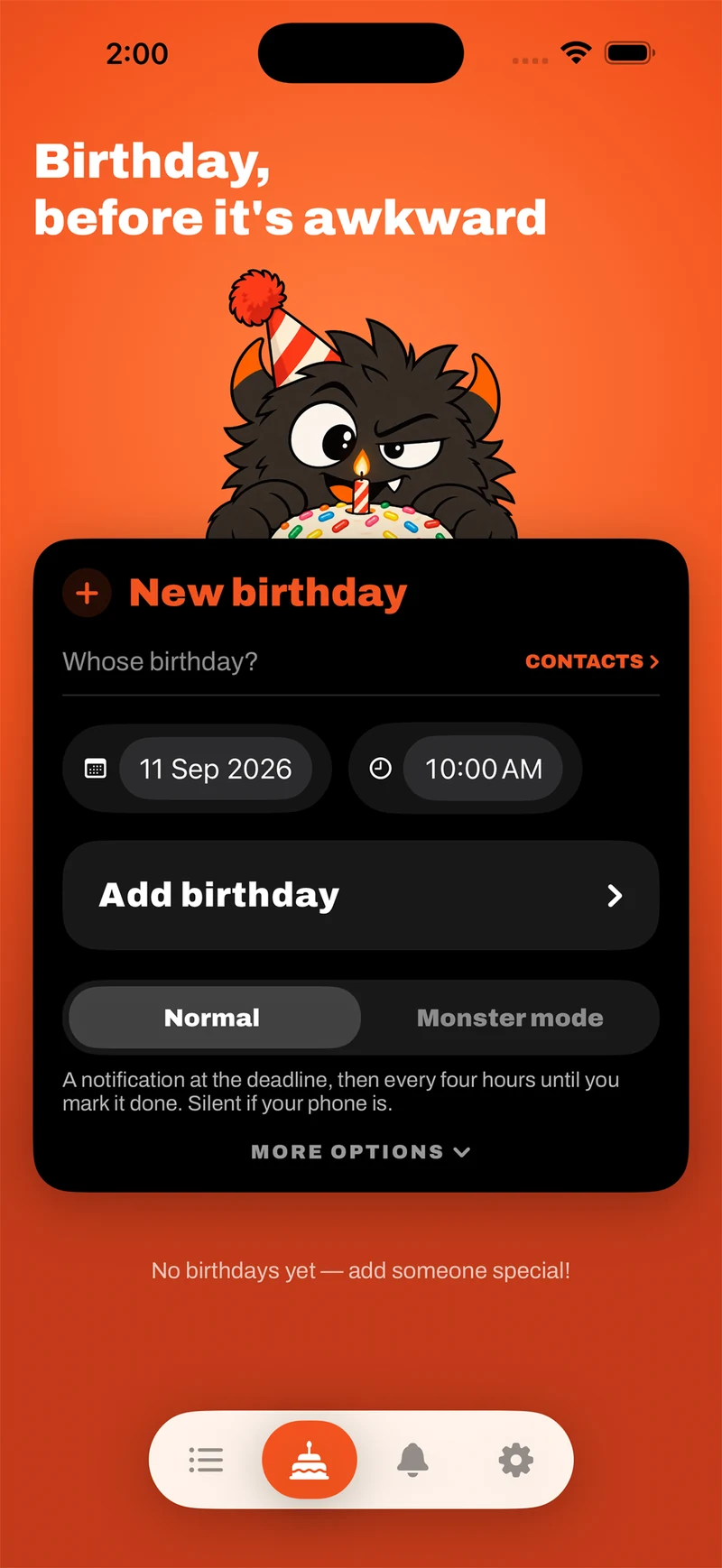
- Open the Birthdays tab. Look for the cake icon and the New birthday form.
- Choose the person. Use Contacts to select a person you have allowed the app to access, or enter the person's name. Check the birthday date rather than relying on the form's initial date.
- Set the time and reminder mode. Review the date, time, and Normal or Monster mode selection. Normal uses notifications; Monster mode uses an alarm with permission. The Silent mode guide explains the difference.
- Tap Add birthday. Open the saved birthday and check that the person and date are right.
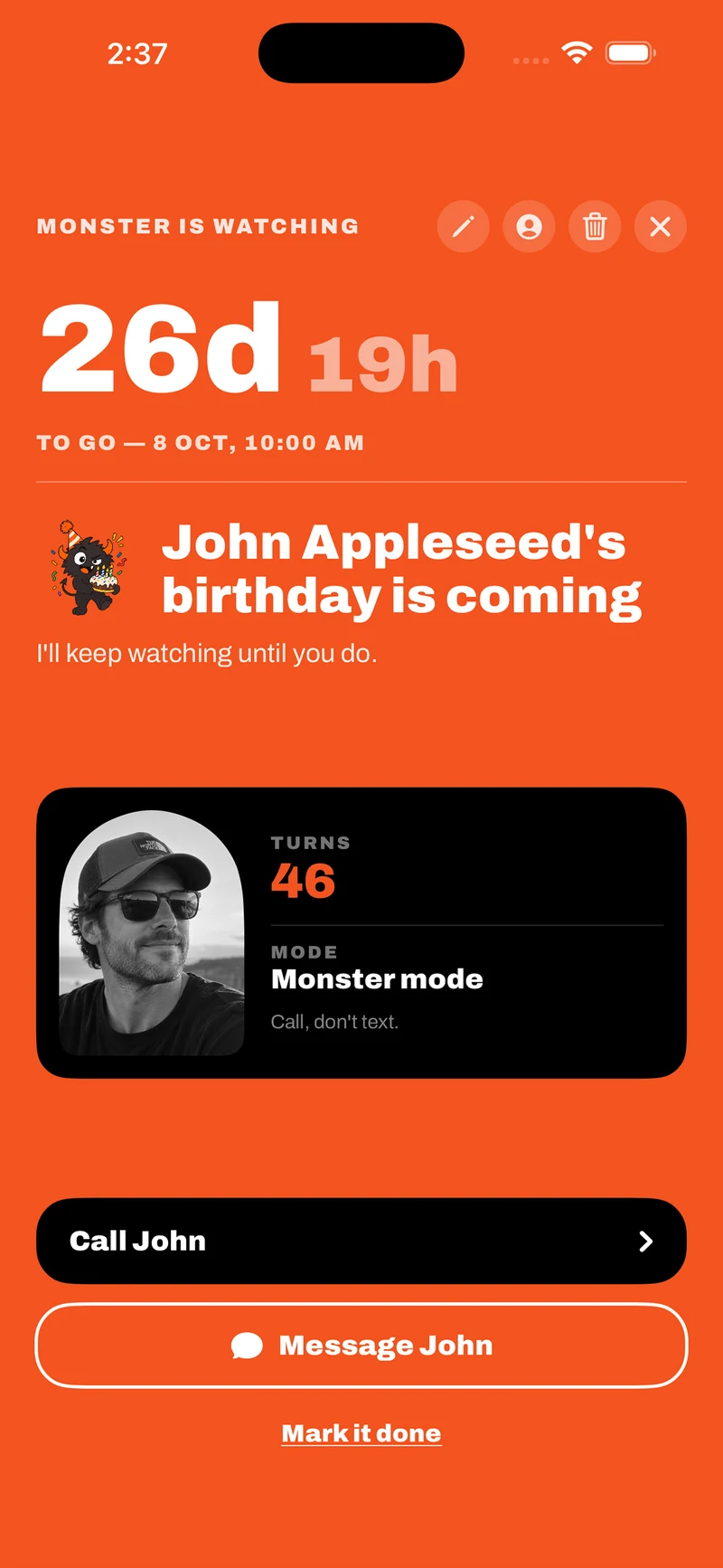
Call or WhatsApp from the reminder pop-up
When the reminder pops up, you can call the person or open their WhatsApp chat directly from it. You choose the action and send the message yourself. The screenshot labels the action Message John; it does not send an automatic birthday greeting.
A Pro gift reminder serves an earlier moment: time to choose a present or arrange delivery. Give it a specific job, such as “Arrange Sam's birthday present”, so you know what to do when it arrives.
Why are birthday reminders not showing on my iPhone?
- The birthday is missing from Calendar. Check the person's birthday field in Contacts, then make sure Birthdays is selected in Calendar's calendar list.
- The birthday appears, but no alert arrives. Review Calendar's birthday alert time and notification settings. Focus and Scheduled Summary can affect when notifications reach you. See Apple's notification settings guide.
- A person is missing from Nudge Monster's Contacts choices. Check whether the app has access to that contact and whether the contact has a birthday saved. Review the Contacts access you granted before importing again.
- The date or age looks wrong. Check the saved day, month and year. If you do not know the birth year, do not invent one just to fill the field.
- You want a visible countdown. Follow the Lock Screen and Dynamic Island countdown guide to check supported phones and Live Activity settings.
Check one upcoming birthday and make a harmless test reminder to confirm notification delivery on your own phone. If something still does not work, the support page has setup checks and a way to contact me.
Remember the birthday. Then reach out.
Birthday nudges, Live Activity countdowns and optional Monster alarms in one iPhone app.
Download on the App StoreiPhone · iOS 26 or later · Free download · Optional Pro subscription